
- One-Time Fix · GA4 & Conversion Tracking
Most eCommerce stores are
making decisions on broken data.
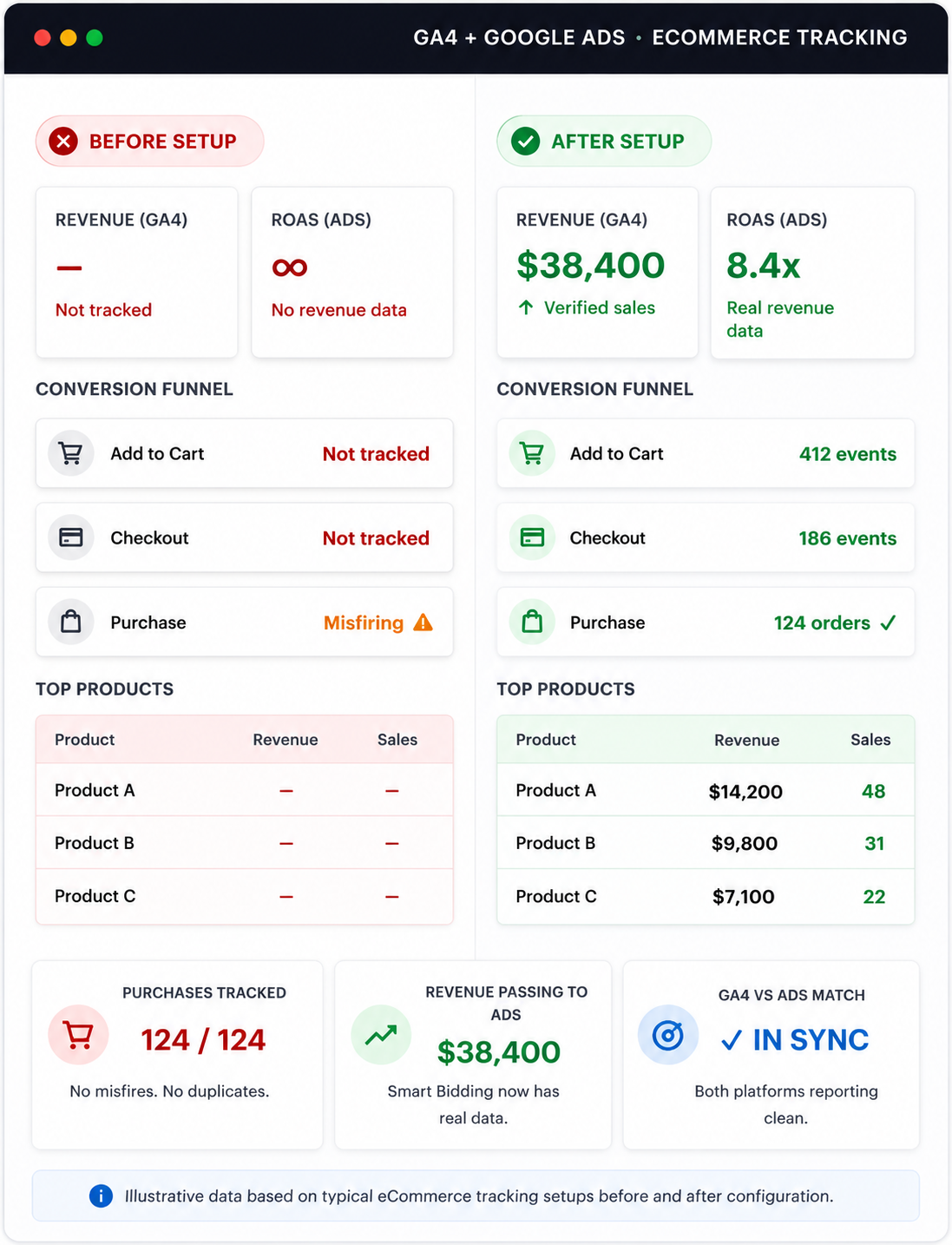
You have numbers in GA4 and numbers in Google Ads. But if eCommerce tracking was never properly configured, those numbers are wrong. Misfiring purchases, missing revenue, unattributed sales. We set it up correctly, verify every conversion, and give you data you can actually trust.
Delivered in 3 to 5 business days
Google Ads, sales and revenue tracked
20+ years in Google Ads and analytics
Free when paired with any retainer
- WHAT'S INCLUDED
Everything configured and verified.
Not just tags dropped on a page. Every conversion action tested against live transactions and confirmed reporting correctly. Wrong data is worse than no data.
GA4 eCommerce event tracking
Full eCommerce event configuration, view_item, add_to_cart, begin_checkout, and purchase, with revenue, quantity, and product data in every event. Verified against your live store before handover.
Google Ads conversion tracking
Purchase conversion action configured with transaction value and order ID passing correctly into campaigns. Deduplication set up between GA4 and Google Ads tags to prevent inflated conversion counts.
Google Tag Manager setup
GTM container audited, cleaned, and organised before new tags are added. Existing duplicate or misfiring tags removed. Final container is documented and structured for long term maintainability.
Revenue and sales verification
Test transactions run against your live store. Revenue figures confirmed matching between GA4, Google Ads, and your order system before setup is signed off. No handover until the numbers align.
Micro conversion tracking
Add to cart, begin checkout, and phone call conversions set as secondary actions. Provides additional Smart Bidding signal without affecting the primary purchase conversion that campaigns optimise toward.
Looker Studio dashboard
A live revenue dashboard connected to your GA4 and Google Ads data showing transactions, revenue, ROAS, and cost per sale. Shared with edit access so you own it permanently and it updates automatically.
- WHAT'S INCLUDE
One flat fee. Verified and documented.
Everything configured, tested, and handed over with documentation. You own the setup. Accounts, tags, and dashboard stay with you.
GA4 eCommerce tracking, fully configured
All standard eCommerce events set up and verified. Revenue, product data, and order IDs passing correctly into GA4 reports. Tested against live orders before handover.
Google Ads conversion actions, set and verified
Purchase conversion with transaction value confirmed passing to campaigns. Deduplication in place. Smart Bidding has accurate purchase data to work from day one.
Setup documentation
Written record of what was configured, where, and why. Includes GTM container summary, conversion action list, and notes on any existing tags modified during the audit and cleanup.
Looker Studio revenue dashboard
Live dashboard showing revenue, transactions, ROAS, conversion rate, and cost per sale. Connected directly to GA4 and Google Ads. Shared with edit access so you own it permanently.
GA4+ Conversion Tracking Setup
- GA4 eCommerce event tracking
- Google Ads purchase conversion with revenue
- GTM container audit, cleanup, and setup
- Revenue and sales verified before handover
- Micro conversions: cart, checkout, phone calls
- Looker Studio revenue dashboard
- Written setup documentation
- SOUND FAMILIAR?
Three situations we see in almost every
eCommerce account we audit.
Each one quietly drains ROAS. Most store owners assume it is a budget problem. It usually is not.
PMax is spending. You don't know where the money is going.
Performance Max consolidates everything and reports aggregate ROAS. You cannot see which products, placements, or search terms are driving revenue — and which are eating budget with nothing to show for it.
The account reports conversions. The revenue in your store doesn't match.
Google Ads is counting add-to-carts or sessions as purchases. The bidding algorithm has been optimising toward a signal that has nothing to do with actual orders — compounding the problem every day it runs uncorrected.
Your best and worst products are getting the same budget.
A 6× ROAS product and a 0.8× ROAS product running in the same campaign with the same bid strategy. No segmentation. The feed is sending everything to the same auction regardless of margin or conversion history.
- WHO THIS FAR
Right for your store if any of these apply.
Tracking problems are common and often invisible until you look. Most stores running Google Ads have at least one issue affecting campaign performance.
Google Ads ROAS looks strong but sales feel low
Campaigns reporting strong ROAS but revenue does not reflect it. Usually a sign conversions are misfiring or transaction values are not passing to campaigns correctly.
GA4 and Google Ads numbers do not match
Different conversion counts across platforms make it impossible to trust either report. Deduplication and source alignment resolves this cleanly.
Launching Google Ads for the first time
Starting campaigns without proper tracking means Smart Bidding has no signal to learn from. Getting tracking right before launch avoids weeks of wasted spend.
Moved platforms or rebuilt the site
A platform migration or redesign often breaks existing tracking silently. Tags remain in place but fire incorrectly. A full audit and reset is cleaner than patching old setup.
GTM is a mess from multiple agency handoffs
Years of handoffs leave containers with duplicate tags, misfired triggers, and no documentation. We audit, clean, and rebuild so the container is usable going forward.
Phone calls and leads not tracked alongside sales
Stores generating phone enquiries alongside online sales often miss those conversions entirely. Call tracking closes that gap and gives campaigns a more complete picture of what is converting.
- HOW IT WORK
Four steps from brief to verified.
We audit what is already in place before making changes. Nothing is rebuilt unnecessarily. Nothing is left broken.
You share
account access
GTM editor access, Google Ads standard access, and GA4 editor access. We review what is currently in place before making any changes to the container or conversion actions.
We audit
and clean
Existing tags, triggers, and conversion actions reviewed. Duplicate or misfiring setup identified and removed. GTM container organised and documented before new implementation begins.
We build
and verify
Full eCommerce tracking implemented and tested via Tag Assistant and live transactions. Revenue and conversion values confirmed matching across GA4 and Google Ads before anything is published.
We hand
over
Looker Studio dashboard shared, documentation delivered, and a written summary of what was changed and why. Clean setup, clearly documented, owned entirely by you.
- COMMON QUESTION
What people ask before booking.
Does this work with Shopify,
WooCommerce, and other platforms?
Yes. The setup works across Shopify, WooCommerce, BigCommerce, and most major platforms. Implementation method varies slightly by platform but the output is the same: verified tracking with revenue passing correctly into GA4 and Google Ads.
Is the setup really free with
a retainer signup?
Yes. Sign up for Google Ads for eCommerce at the same time and the tracking setup fee is waived. It is included in month one at no extra charge. No separate billing or process required.
What if I already have tracking
partially set up?
We audit what is in place before making changes. If the existing setup is partially correct, we build on it. If it is cleaner to rebuild from scratch, we do that. Either way the result is a verified setup, not a patch on top of something broken.
What level of access do you
need to our accounts?
GTM editor access, Google Ads standard access, and GA4 editor access. No billing access or account ownership at any point. All access can be removed after delivery if you prefer. The setup stays in place regardless.
How long does the setup
actually take?
Delivered within 3 to 5 business days of receiving account access. Stores with complex GTM containers or unusual platform setups may sit toward the longer end. We confirm the expected delivery date before starting work.
What if something breaks
after handover?
If anything we configured stops working within 30 days of delivery due to our setup, we fix it at no charge. Platform updates or third party app changes that break tracking after handover fall outside that scope, but we can advise on fixes.
GET IT SETUP
Tell us what you are running. We will find out what is broken.
Share your platform, what tracking is currently in place, and whether you are pairing this with a retainer. We review the setup and confirm what needs to be fixed before any work starts.
- Delivered in 5 to 7 business days
- No obligation to continue after the audit
- You own everything: accounts, tags, dashboard