

How Furniture Stores in Canada Can Use SEO + Google + Facebook Ads to Drive Local Sales
The Challenge for Furniture Retailers
If you run a furniture store in Canada, chances are your website is doing two jobs at once:
- Helping local shoppers browse products and prices before visiting your showroom.
- Occasionally capturing online orders (but usually from people within a 30–40 km radius).
Here’s the problem: if customers don’t find you on Google when they search “furniture store near me” or “buy sectional sofa Toronto”, they’ll end up in someone else’s showroom — not yours.
Furniture Store Marketing Channels Overview
| Channel | What It Does | Goal | Key Tools |
|---|---|---|---|
| SEO | Rank for local and product searches | Drive showroom visits + traffic | Google Search Console, Yoast |
| Google Merchant Center | Show products in Shopping tab (free & paid) | Product discovery + traffic | GMC, Feed Apps (Shopify/Woo) |
| Facebook & Google Ads | Reach & remarket to local audiences | Stay top-of-mind + drive sales | Meta Ads, Google Ads |
| Tracking & Reporting | Monitor performance across channels | Prove ROI + guide strategy | GA4, Looker Studio, CallRail |
Why SEO is a Must (Not Just “Nice to Have”)
Furniture shopping is a research-heavy decision. Customers don’t buy a $1,200 dining table on impulse. They compare. They check availability. They want reassurance before visiting your store.
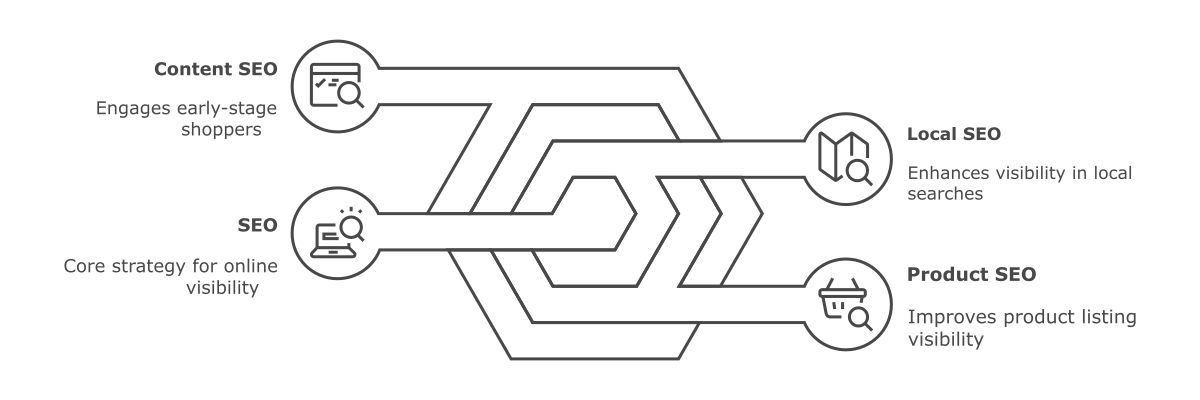
Local SEO
Show up for “[city] furniture store” and “near me” searches.
| Local SEO Element | What to Check | Common Issue | Tool to Use |
|---|---|---|---|
| Google Business Profile | Profile completeness, NAP accuracy | Missing categories or reviews | Google Business Profile |
| "Near Me" Keyword Ranking | Rank for queries like "furniture store near me" | Not showing in map pack | Google Search, Local Rank Tools |
| City-Specific Landing Pages | Pages like /toronto-furniture-store | Generic content or duplicate | Screaming Frog, GSC |
| Mobile Search Appearance | How you appear in local mobile searches | Low CTR, missing map visibility | Mobile search manually |
Product SEO
Make sure your products (sofas, beds, recliners) show up in Google’s free shopping results.
| Product Element | What to Optimize | Issue to Avoid | Platform-Specific Note |
|---|---|---|---|
| Product Titles | Include dimensions, materials, usage | "Blue sofa" too generic | Shopify auto-generates poor titles |
| Meta Descriptions | Focus on value, not generic features | Missing or duplicated tags | WooCommerce may conflict with plugins |
| URLs | Clean, keyword-rich URLs | Shopify /collections/ vs /products/ | Use canonical tags |
| Schema Markup | Add product, review schema | No enhanced listings in Google | Use SEO apps or plugins |
Common Shopify issue: duplicate product URLs with /collections/ and /products/.
Common WooCommerce issue: broken sitemaps or conflicting SEO plugins that prevent Google from indexing your catalog.
Both kill your visibility if left unchecked.
Content SEO
Publish helpful buying guides like “Best Sectionals for Small Condos in Calgary” to capture early-stage shoppers.
| Content Type | Example Topic | Goal | Common Pitfalls |
|---|---|---|---|
| Buying Guides | "Best Sectionals for Small Condos in Calgary" | Capture early-stage shoppers | Generic content with no local relevance |
| Comparison Posts | "Leather vs Fabric Sofas – Which Lasts Longer?" | Help shoppers decide, build authority | Copy-paste from manufacturers |
| Style Inspiration Posts | "Top 5 Dining Room Trends in Toronto Homes" | Position store as expert in design | Thin content without images or examples |
| Seasonal/Promo Content | "Spring Furniture Sale – Save on Patio Sets" | Drive urgency and showroom visits | Duplicated promo text across all pages |
Google Merchant Center (Free & Paid Shopping)
Most furniture retailers don’t realize this: you can get your products listed in Google Shopping for free with Google Merchant Center.

- Free Listings = your products can appear in Google’s shopping tab at no cost.
- Paid Shopping Ads = your products show at the very top of search results with image, price, and store name.
| Element | What to Check | Common Problems | Action Item |
|---|---|---|---|
| Product Feed | Syncs properly from Shopify/Woo | Plugin issues, feed errors | Test with Feed Debugger |
| GTIN & Pricing | Accurate, up-to-date in feed | GTIN missing or price mismatch | Validate in GMC diagnostics |
| Tax & Shipping Rules | Correct for Canadian regions | Not syncing → disapprovals | Check feed and settings |
| Approval Rate | % of approved vs disapproved products | Less than 90% approval = lost exposure | Monitor weekly in Merchant Center |
Notes: furniture stores often get product disapprovals because of price mismatches or missing GTINs. If you’re on WooCommerce, plugin conflicts can break your feed. If you’re on Shopify, double-check that tax and shipping settings sync correctly.
Paid Ads + Remarketing (Where Furniture Really Wins)
Here’s the thing — furniture buyers don’t purchase on the first visit. The decision cycle is long. That’s why remarketing is your best friend:
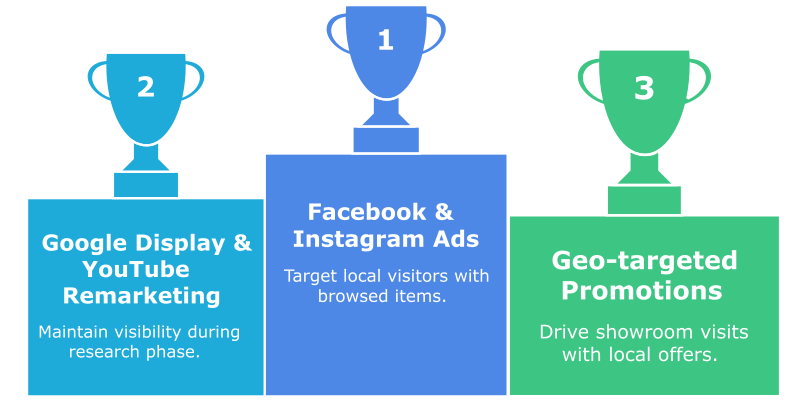
- Facebook & Instagram Ads → Target only people within 30–40 km who’ve visited your site. Show them the sofa they browsed last week.
- Google Display & YouTube Remarketing → Stay top-of-mind while they research elsewhere.
- Geo-targeted promotions → "Visit our Toronto showroom this weekend – save 10%."
| Campaign Type | Target Strategy | Why It Matters | Tools/Channels |
|---|---|---|---|
| Facebook & Instagram Ads | Radius-based, product view retargeting | Long buyer journey needs reminders | Meta Ads Manager |
| Google Display Ads | Visual retargeting | Keep brand visible during research | Google Ads |
| Geo-targeted Promotions | Event or showroom-specific offers | Drive foot traffic this weekend | Facebook, Instagram, Google Display |
| Dynamic Product Retargeting | Show exact item previously viewed | Increases conversions & lowers cart abandonment | Meta Pixel, Google Tag |
Real example: A WooCommerce furniture store in Ontario added dynamic remarketing (showing people the exact product they viewed). Result: in-store visits went up and cart abandonments dropped by 15%.
Tracking What Really Matters (GA4, Calls, and Showroom Visits)
Here’s the thing — running SEO and ads without tracking conversions is like flying blind. You need proof of what’s working.

- GA4 Conversion Tracking → Track online orders, quote requests, and form fills.
- In-Store Visit Tracking → Connect Google Ads & Google Business Profile to measure “store visit conversions” (people who saw your ad, then visited your showroom).
- Call Tracking → Track calls from your website and Google Business Profile to see how many sales inquiries ads are driving.
- Google Business Profile Reports → See how many people requested directions, called you, or viewed your photos.
| Tracking Area | What to Track | How to Track It | Tools Used |
|---|---|---|---|
| Online Conversions | Purchases, form fills, quote requests | GA4 Enhanced eCommerce | GA4, Shopify, WooCommerce |
| In-Store Visits | Visitors who saw ad → came to showroom | Google Ads + Business Profile linkage | Google Ads, GBP |
| Call Tracking | Calls from website & local search | Dynamic call numbers | CallRail, Google Forwarding |
| Revenue Accuracy | Compare eComm platform vs GA4 | Should be within 10% | GA4, Shopify/Woo |
Pro Tip: In GA4, compare Shopify/WooCommerce revenue vs GA4-reported revenue. If the gap is more than 10%, your tracking is broken.
Reporting & Dashboards (So You Actually See ROI)
Most furniture retailers don’t have time to log into five different tools. That’s why we set up:
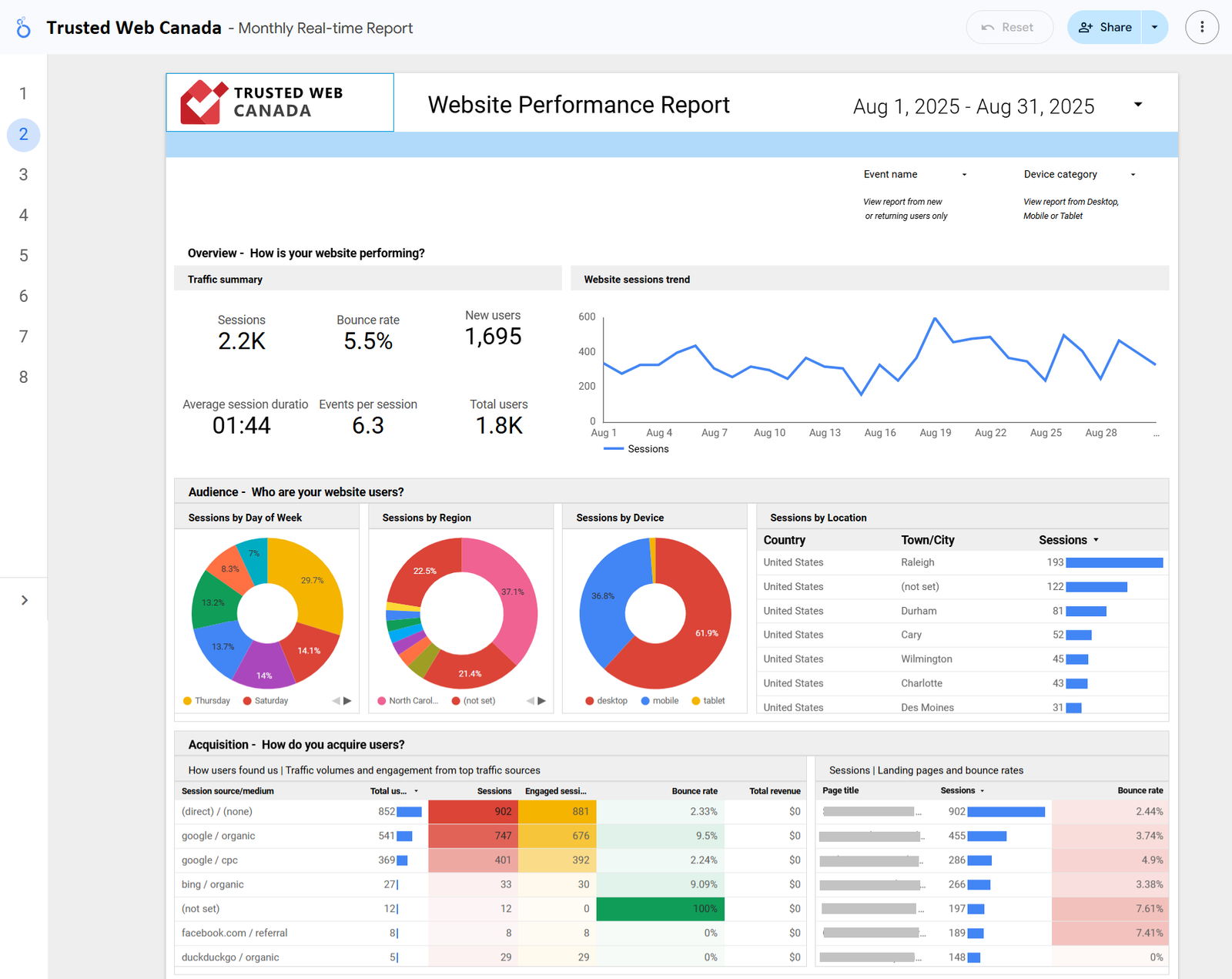
- Automatic Reports delivered by email weekly.
- Custom Dashboards in Looker Studio showing:
- Website traffic & SEO rankings
- Online sales + leads from GA4
- Calls from Google Business Profile
- In-store visits tracked from ads
| Report Section | What It Shows | Frequency | Why It Matters |
|---|---|---|---|
| Website Traffic & SEO | Organic sessions, top landing pages | Weekly or Monthly | See if SEO is driving showroom visits |
| Online Sales & Leads | Conversions from GA4 + CRM | Weekly | Track true ROI of online efforts |
| GBP Performance | Calls, direction requests, photo views | Monthly | Shows real-world actions taken |
| Ad Campaign Metrics | ROAS, click-to-visit, impressions | Weekly | Prove paid media is moving buyers |
The Winning Combo for Furniture Retailers
- SEO → Own your city’s search results for furniture.
- Google Merchant Center → Free listings + paid Shopping Ads.
- Remarketing Ads → Remind nearby shoppers until they buy.
- Tracking & Reporting → See online sales, calls, and showroom visits clearly.
Quick Self-Check for Store Owners
Open your phone right now:
- Search “furniture store near me.” Do you appear in the local map pack?
- Search “buy dining table [your city].” Are you on page one?
- Check your GA4 → Are conversions and sales tracking correctly?
- Look at your Google Business Profile → Do you know how many people called or asked for directions last month?
If you can’t answer these, you’re probably losing sales without even realizing it.
Final Word
Canadian furniture stores don’t need to fight Wayfair nationwide. You just need to dominate your local radius online — with SEO, Google Merchant Center, geo-targeted ads, and crystal-clear reporting that proves it’s working.
Want us to run a flat-rate audit?
We’ll check your SEO, GMC feed, GA4 tracking, and set up reporting dashboards so you can finally see what drives both online sales and showroom visits.